Zero Downtime Migrations: Shadow Table Strategy Explained
Table of contents
Zero Downtime Migrations: Shadow Table Strategy Explained
It’s 2 AM, you’re deploying a “simple” column type change to production, and the whole application is down because the table lock is taking forever. Your phone starts buzzing with angry Slack notifications, and you’re trying to explain to your team why the “5-minute migration” has been running for 30 minutes.
What’s the Shadow Table Strategy?
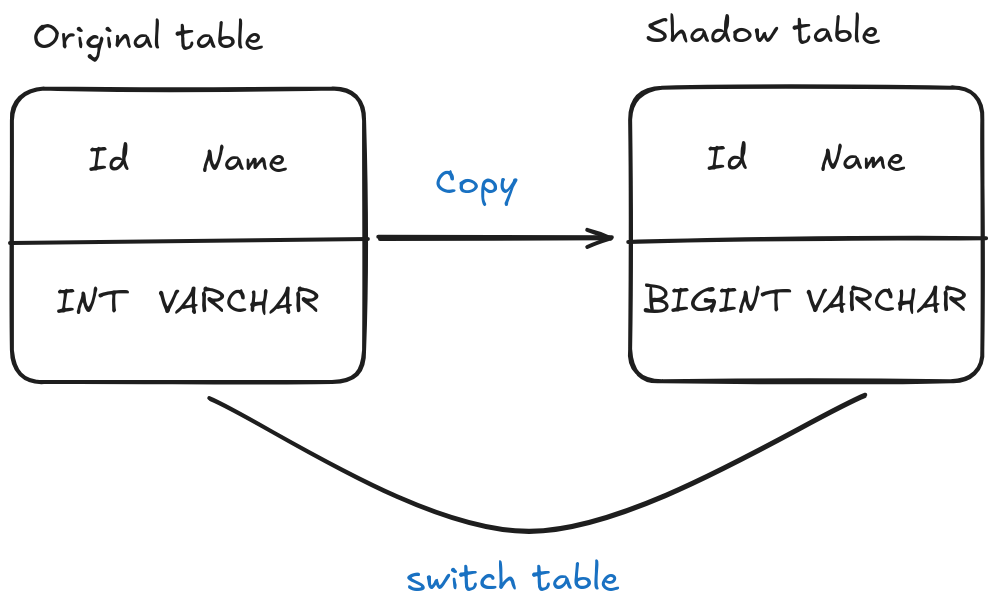
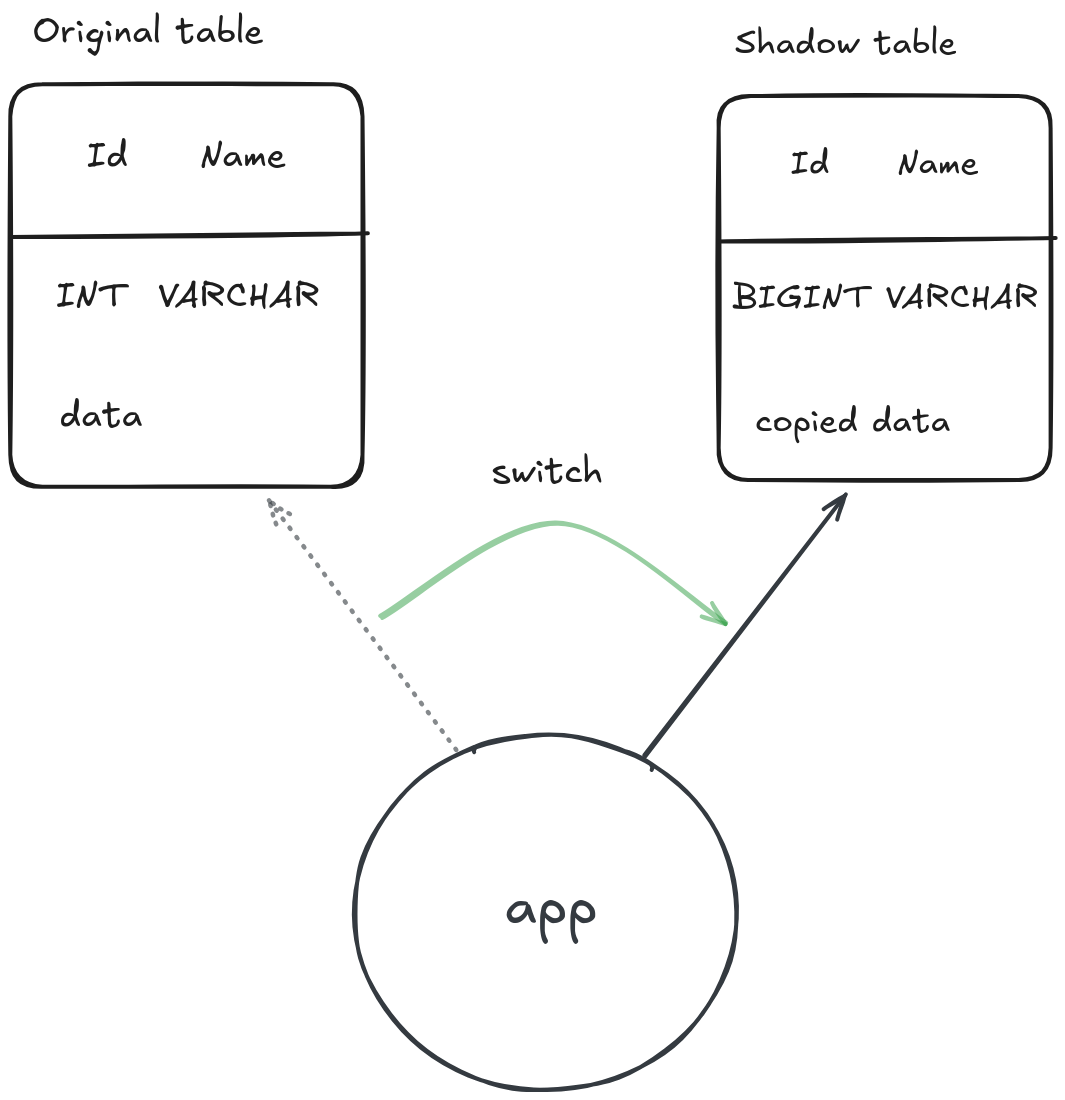
The shadow table strategy is like having a stunt double for your database table. Instead of modifying your original table directly (and potentially bringing your application to its knees), you create a shadow clone new table with the desired structure, gradually copy data over, and then perform a lightning-fast switcheroo.
Here’s the basic flow:
What Problem Does This Solve?
Traditional ALTER TABLE operations can be absolute nightmares in production if you’re dealing with websites that have billions of records. When you run something like ALTER TABLE users MODIFY COLUMN id BIGINT, most database engines will:
- Lock the entire table for the duration of the operation
- Block all reads and writes while restructuring the table
- Take hours on tables with billions of rows
- Risk timeouts that leave your database in an inconsistent state
The shadow table strategy breaks the database migration into smaller chunks that don’t require long-running locks. Your application stays online and you don’t get notifications at 3 AM.
What about smaller tables
If your table doesn’t have millions of rows and it’s not critical that the database keeps running, you can always just send an email notifying your users that your app will be under maintenance for a short period.
I mean nobody is going to hate you if your furry images site is down for a couple of hours, put a “touch some grass” page and perform the migration, don’t obsess unnecessarily about your app’s performance.
However, if that’s not the case and the business is losing money for every second that the database is locked…
Steps to Perform a Table Modification Using Shadow Table Strategy
Let’s walk through a real-world example where we need to change a user ID from INT to BIGINT because we’re approaching the 2.1 billion limit.
Stonks. Congratulations if you’re the one running the show.
Step 1: Create the Shadow Table
First, create your new table with the desired structure:
-- Create the shadow table with the new structure
CREATE TABLE users_new (
    id BIGINT PRIMARY KEY AUTO_INCREMENT,
    name VARCHAR(255) NOT NULL,
    email VARCHAR(255) UNIQUE NOT NULL,
    created_at TIMESTAMP DEFAULT CURRENT_TIMESTAMP,
    updated_at TIMESTAMP DEFAULT CURRENT_TIMESTAMP ON UPDATE CURRENT_TIMESTAMP
) ENGINE=InnoDB;

-- Copy indexes from the original table
CREATE INDEX idx_users_email ON users_new(email);
CREATE INDEX idx_users_created_at ON users_new(created_at);
Step 2: Set Up Data Synchronization
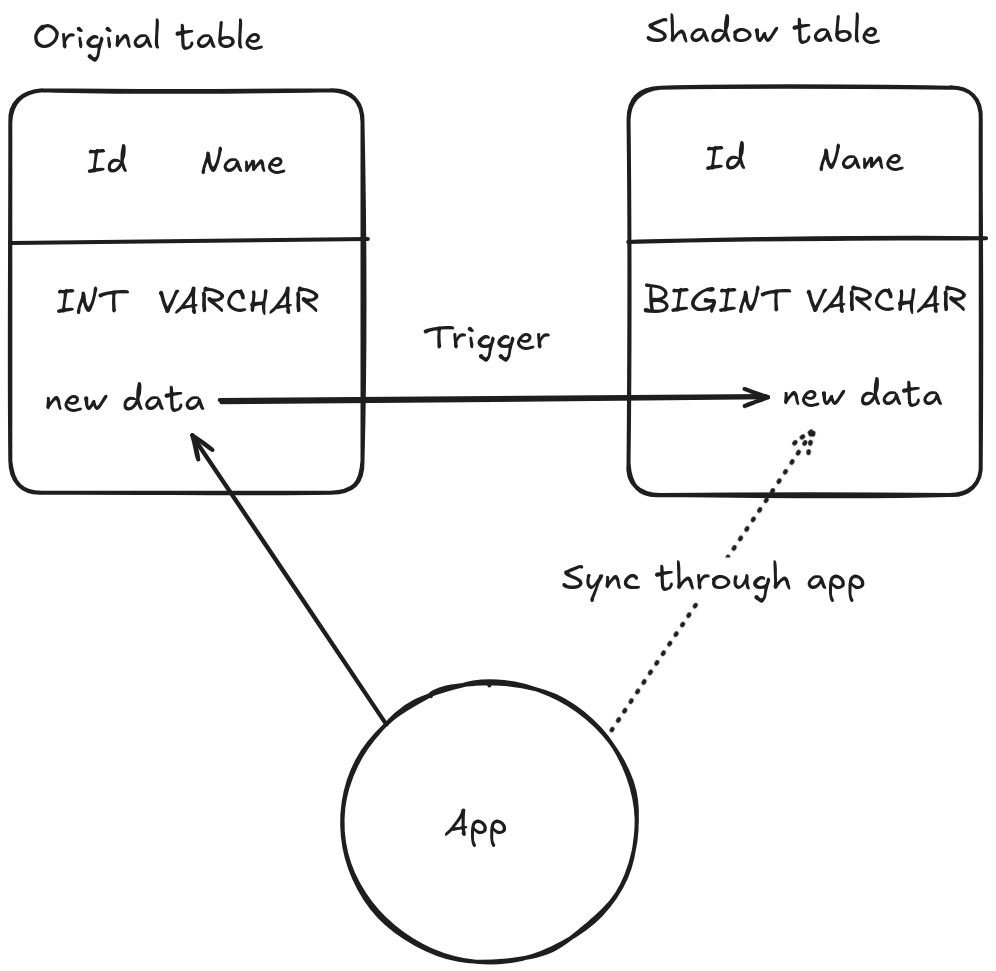
You need to keep the shadow table in sync with the original while your application keeps running as if nothing were happening.
Yes, you’re duplicating writes and running two tables instead of one. There are two approaches:
Use database triggers
-- Create triggers to keep shadow table in sync
DELIMITER $$

CREATE TRIGGER users_insert_sync
    AFTER INSERT ON users
    FOR EACH ROW
BEGIN
    INSERT INTO users_new (id, name, email, created_at, updated_at)
    VALUES (NEW.id, NEW.name, NEW.email, NEW.created_at, NEW.updated_at);
END$$

CREATE TRIGGER users_update_sync
    AFTER UPDATE ON users
    FOR EACH ROW
BEGIN
    UPDATE users_new
    SET name = NEW.name,
        email = NEW.email,
        updated_at = NEW.updated_at
    WHERE id = NEW.id;
END$$

CREATE TRIGGER users_delete_sync
    AFTER DELETE ON users
    FOR EACH ROW
BEGIN
    DELETE FROM users_new WHERE id = OLD.id;
END$$

DELIMITER ;
Synchronize data at Application-Level
If you prefer, you can sync the data through your application’s logic instead.
def update_user(user_id, changes):
    # Original write to main table or database
    original_db.execute("UPDATE users SET ...")

    # Shadow write (with transformation)
    shadow_db.execute(
        "UPDATE users_new SET name=? ...",
        data['email']
    )
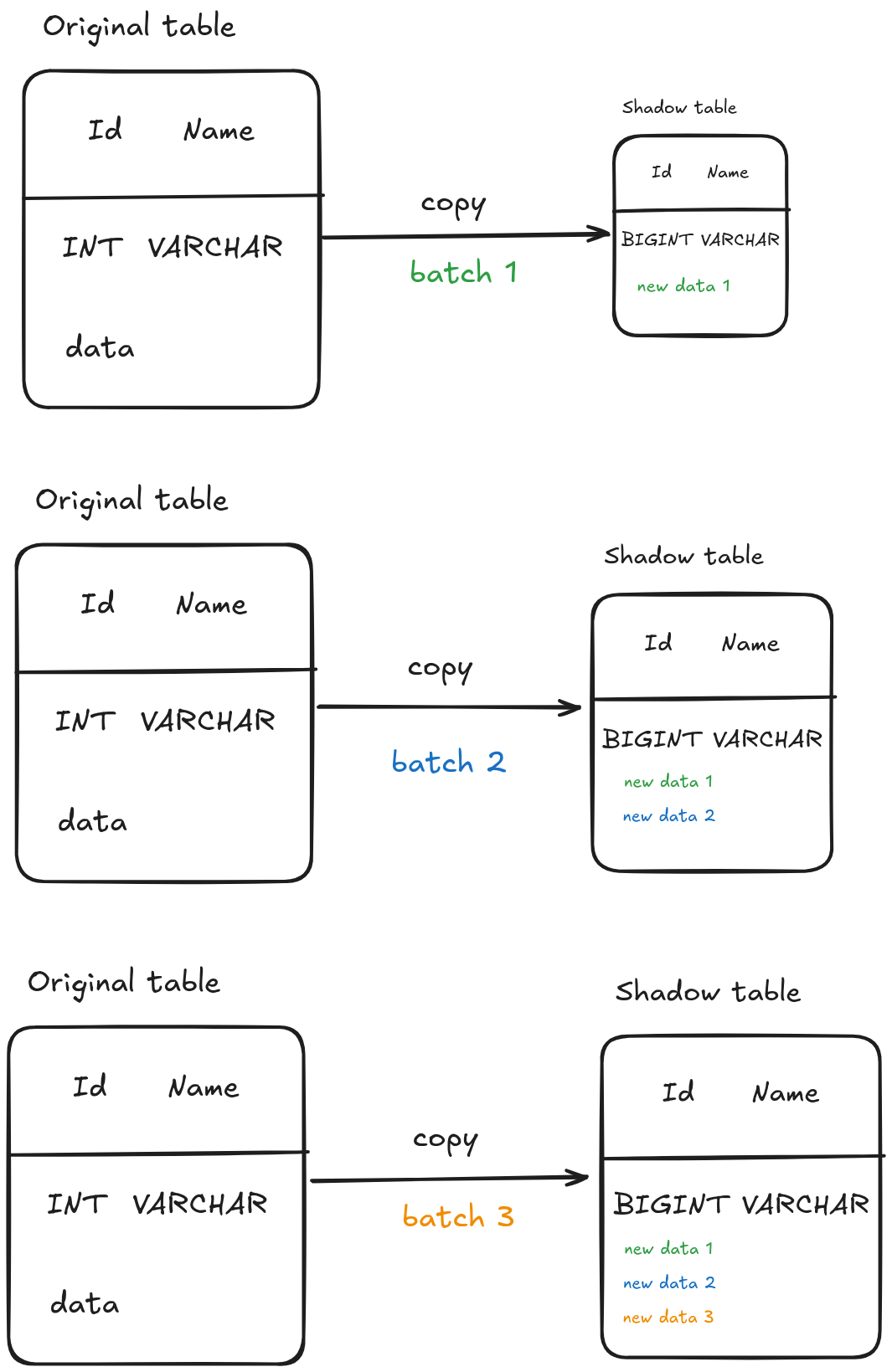
Step 3: Copy Existing Data in Batches
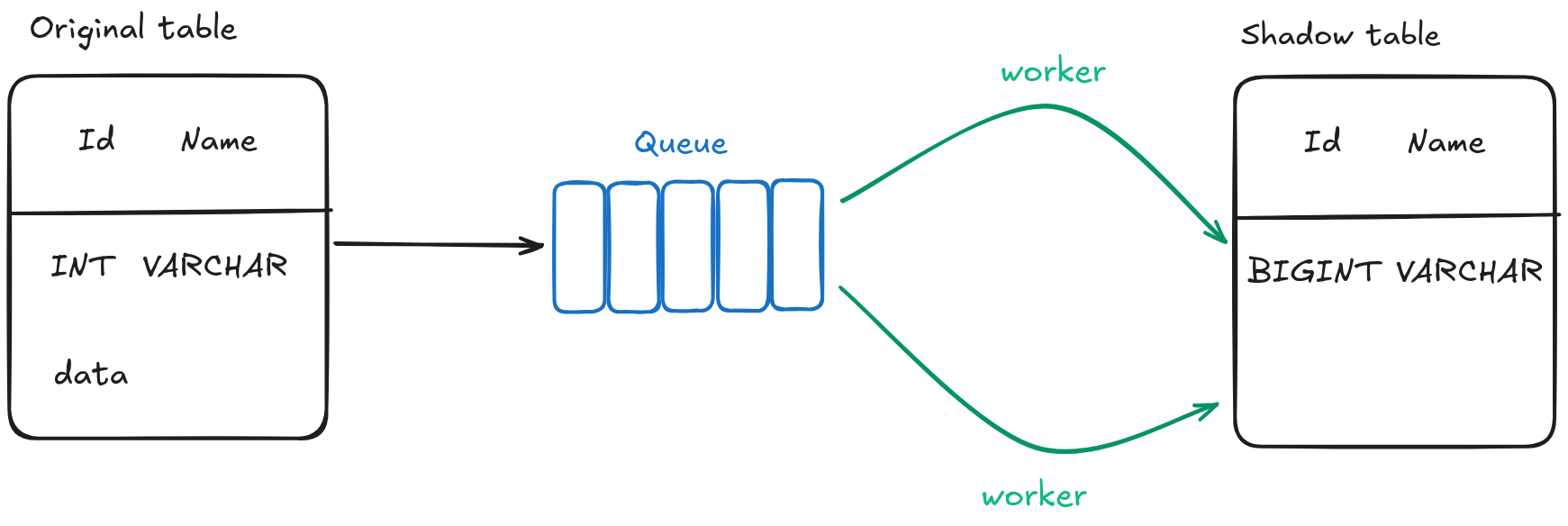
Now comes the bulk data migration. Never try to copy everything at once, that’s a recipe for a digital hecatombe. That’s the reason the worker pool pattern exists.
Make sure you have enough resources and consider doing this during low-traffic periods:
-- Copy data in manageable batches to avoid long locks
SET @batch_size = 10000;
SET @min_id = 0;
SET @max_id = (SELECT MAX(id) FROM users);

-- Loop through batches (you'd typically script this)
WHILE @min_id < @max_id DO
    INSERT INTO users_new (id, name, email, created_at, updated_at)
    SELECT id, name, email, created_at, updated_at
    FROM users
    WHERE id > @min_id AND id <= @min_id + @batch_size
    ON DUPLICATE KEY UPDATE
        name = VALUES(name),
        email = VALUES(email),
        updated_at = VALUES(updated_at);

    SET @min_id = @min_id + @batch_size;

    -- Give the database a breather
    SELECT SLEEP(0.1);
END WHILE;
Step 4: Verify Data Consistency
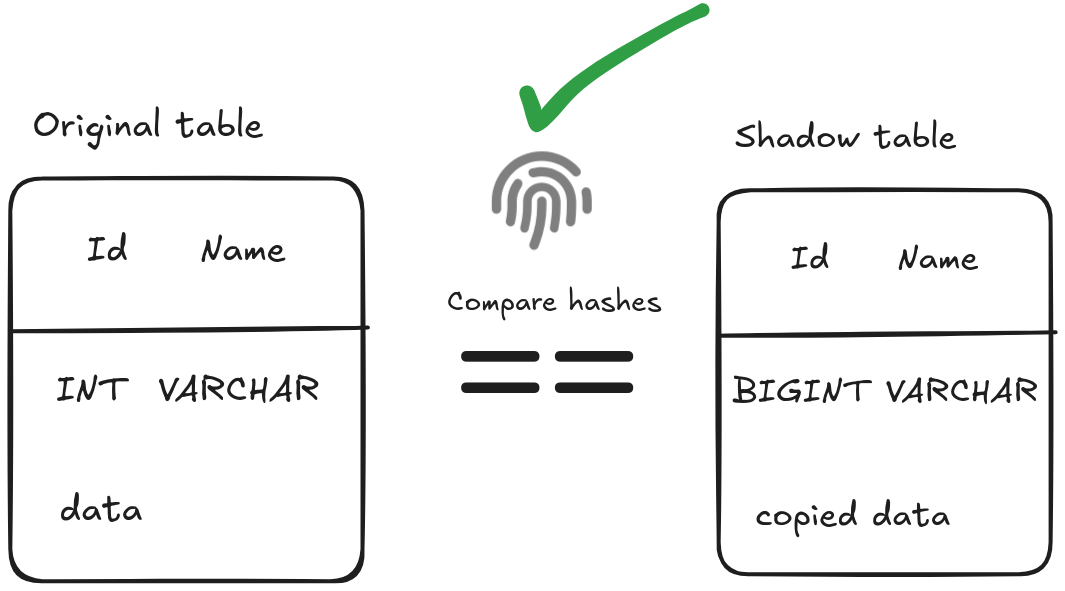
Before you make the switch, you better be damn sure everything copied correctly:
-- Check row counts match
SELECT
    (SELECT COUNT(*) FROM users) as original_count,
    (SELECT COUNT(*) FROM users_new) as shadow_count;

-- Check data integrity with checksums
SELECT
    (SELECT SUM(CRC32(CONCAT(id, name, email))) FROM users) as original_checksum,
    (SELECT SUM(CRC32(CONCAT(id, name, email))) FROM users_new) as shadow_checksum;

-- Spot check some random records
SELECT * FROM users WHERE id IN (1, 1000, 50000) ORDER BY id;
SELECT * FROM users_new WHERE id IN (1, 1000, 50000) ORDER BY id;
Step 5: The Great Switcheroo
Here’s where your heart rate spikes. The actual table swap should take milliseconds, like an unnecessary new shiny Rust library:
-- This should take milliseconds, not minutes
START TRANSACTION;

-- Drop the triggers first (no more syncing needed)
DROP TRIGGER users_insert_sync;
DROP TRIGGER users_update_sync;
DROP TRIGGER users_delete_sync;

-- Rename tables atomically
RENAME TABLE users TO users_old, users_new TO users;

COMMIT;
Step 6: Clean Up and Verify
Clean up and realize everything went wrong celebrate.
-- Verify everything is working
SELECT COUNT(*) FROM users;
SELECT * FROM users LIMIT 5;

-- After you're confident everything works (give it a day or two, nevermind, maybe a couple of months)
DROP TABLE users_old;
Handling Tables with Millions of QPS
For tables with millions of QPS, or millions of concurrent users , you can put a queue between the application and the shadow writes. Queue shadow writes in Redis or Kafka if the database can’t handle dual writes; the buffer absorbs the spikes and the shadow table catches up afterwards.
If column renames are getting out of hand, use views to hide them:
  CREATE VIEW users_combined AS
  SELECT id, COALESCE(new_id, id) AS unified_id FROM users_new
  UNION ALL SELECT id, name FROM users WHERE NOT EXISTS (...);
Common Errors While Implementing Shadow Tables
Let me save you some pain by sharing some common mistakes I’ve seen and read about and made:
- Forgetting about foreign key constraints. If other tables reference yours, you’ll need to disable the checks temporarily or handle the references carefully. Your data integrity depends on it.
- Not testing the triggers thoroughly. Triggers can fail silently or behave strangely under load. Test them with realistic data volumes and concurrent operations before going to production.
- Underestimating the sync lag. During heavy write periods your triggers can fall behind. Monitor the sync status and be ready to throttle writes.
- Inadequate monitoring. You need to see migration progress, sync lag, and errors while it runs, not after things go wrong. Set up monitoring before you start.
- Poor rollback planning. Always have a plan B. If something goes sideways during the switchover, you need to be able to revert quickly.
Handling Shadow Tables in Distributed Systems
Consider service discovery, connection pooling, and cache invalidation. When you rename your tables, every service instance needs to know about the change at the same time.
This often means a coordinated deployment where you stop traffic temporarily, perform the switch, and restart services afterwards.
Consider using feature flags, like the ones I covered in my post about deployment patterns , to control which table your application reads from. That way you can move traffic over gradually.
Databases with read replicas
Ensure your shadow table has been fully replicated before performing the switch. Monitor replication lag carefully, since the switch needs to happen consistently across all replicas.
Monitoring Performance During the Transition
During the migration you’re running two tables in parallel, so I/O usage roughly doubles. Watch disk usage.
Triggers add overhead to every single INSERT, UPDATE, and DELETE operation. Set up alerts for unusually long trigger execution times.
Compare row counts between the original and shadow tables as you go. If the gap between them grows, there is something fishy going on.
Handling Unique Constraints and Foreign Keys
For unique constraints, ensure the shadow table maintains exactly the same uniqueness guarantees as the original table.
When copying data in batches, use INSERT … ON DUPLICATE KEY UPDATE or equivalent upsert logic to handle potential duplicates, especially if your application keeps writing data during the migration.
For foreign key constraints, you can disable the checks during the migration, but you’re risking data integrity. It’s always a trade off. Use deferred checks (if you’re using PostgreSQL) or disable FK checks (MySQL SET FOREIGN_KEY_CHECKS=0).
Alternatively, you can create the foreign key constraints on the shadow table and update the referencing tables after the main migration finishes.
Dealing with Triggers and Stored Procedures
Existing triggers and stored procedures can be a pain in the…
First, list all existing triggers on your table. You’ll need to recreate them on the shadow table, and execution order matters. Your sync triggers should generally run last, after all business logic triggers.
Stored procedures that reference the table need updating after the migration. Use synonyms or views to minimize the number of procedures that require changes.
Test trigger interactions thoroughly in a staging environment to avoid surprises.
Verifying Data Consistency Before Cutover
Compare aggregate values like sums, averages, and counts. Use checksums or hash your data to confirm that row data matches exactly between tables. Statistics is your friend; work out how many records you need to sample for a 95% confidence level.
Create automated consistency check scripts that you can run repeatedly during the migration.
Checksum tools such as pg_checksums, or a custom COUNT(*) and hash_agg() query, do the same job.
The Rollback Plan (When Everything Goes to Hell)
Are you familiar with Murphy’s Law? Well, you know the drill then.
The simplest rollback is to reverse the rename. Keep your original table as <table_name>_old, or whatever you want, during the cutover period, so you can rename it back quickly if Murphy shows up.
For more complex rollbacks, you might need to reverse-sync data from the shadow table back to the original. Maintaining reverse triggers during the cutover gives you that option at the cost of more complexity.
When production is on fire, you don’t want to be figuring out rollback commands on the fly. Document the rollback procedure and practice it in staging.
Consider application-level rollback using feature flags or configuration changes. I talked a little about them in my post about deployment patterns. Sometimes pointing your application back to the old table is faster than a database-level change.
Tools to Help You
Some tools can make the process easier:
| Tool | Best For | Notable Feature |
|---|---|---|
| gh-ost | MySQL | Triggerless replication |
| pg_repack | PostgreSQL | Online table reorganization |
| Liquibase | Cross-DB | Change tracking |
| Debezium | CDC streaming | Kafka integration |
Wrapping Up
The shadow table strategy is far from perfect, and plenty can go wrong.
Every database and application is different. What works for a read-heavy table might not work for a write-heavy one. Test in an environment that mimics production as closely as possible.
Aborting the migration at the last minute is fine if things aren’t going to plan. Keeping the service up matters more than playing the hero.