Worker Pool Design Pattern: Interactive Playground
Table of contents
Worker Pool Design Pattern: Interactive Playground
I expanded this post with an interactive, real-time visual simulator to help you understand the worker pool design pattern. You can adjust parameters like the number of workers and failure rate to see how a queue is processed.
A worker pool helps when you need to run many concurrent tasks - like crawling websites, processing image pixels, or handling jobs in bulk.
The simple approach is to spawn a worker per job:
for job in jobs:
    async process_concurrent_job()
This works for small cases, but has problems: it creates workers without limit (memory grows fast), and constantly creating/destroying workers is expensive.
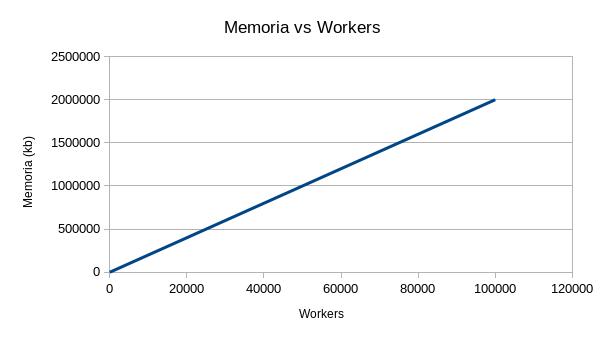
If there is no worker limit, workers will continue to be created to match the tasks
The worker pool pattern fixes this by keeping a fixed number of workers and reusing them.
Interactive worker pool
The worker pool is a classic design pattern .
This pattern has been used to handle a million requests per minute in Go .
How it works
Create a fixed number of workers ( goroutines in Go ) and have them pull jobs from a queue (using channels in Go ). Workers stay alive and reuse themselves, keeping memory usage stable and avoiding constant creation/destruction. Optionally, collect results in a separate queue.
Job queue
Jobs go into a queue - can be fixed or created dynamically.
Worker pool
A fixed number of workers pull jobs from the queue. Each takes a job, runs it, and goes back for the next one.
Worker
A worker loops: get a job if available, process it, repeat until the queue is empty or a stop condition is met.
A fixed pool caps how many tasks run at the same time, keeping resource usage predictable.
Results queue (optional)
Workers can push results to a separate queue for later processing.
This pattern is common in languages with strong concurrency support like Go and is useful for processing large batches of work without overwhelming the system.