My Django Rapid Architecture short overview
Table of contents
My Django Rapid Architecture short overview
I came across “ Django Rapid Architecture ” on Reddit - a short document with guidelines for structuring Django projects. Since I like Django and consider it one of the best tools available , I read it and summarized it here.
Django Rapid Architecture is a collection of patterns and idioms for building maintainable Django codebases. According to the author, it’s based on 15+ years of experience across 100+ production projects.
What’s wrong with Django’s default architecture?
According to the author, Django apps are designed for reusable components, not project-specific business logic. Forcing everything into apps creates inflexibility: migrations lock early boundary decisions, making flexible refactoring harder as projects evolve.
Apps also favor “vertical encapsulation” - grouping views and models by feature. For real-world systems with interconnected business domains and interfaces, this doesn’t fit well.
How to structure projects with Django Rapid Architecture?
Instead of the default app-based approach, structure by layers:
- Data (models/migrations)
- Interfaces (HTTP views/management commands)
- Business logic (readers/actions) kept separate
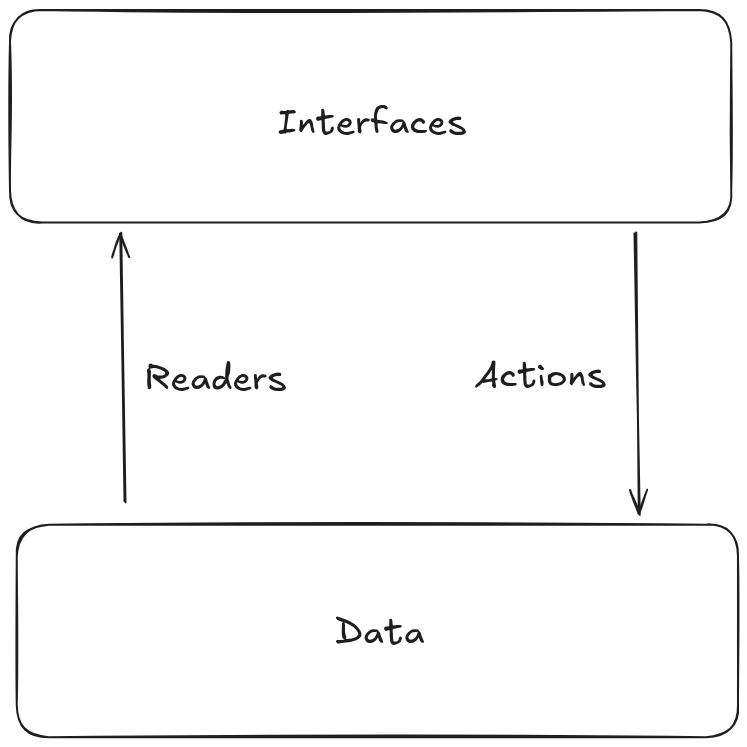
This “horizontal encapsulation” aligns with Django’s natural layering, avoids early architectural lock-in, and models complex domains better.
Remember that Django is a monolith. The author recommends starting with a monolith - it’s less complex and more maintainable than microservices. Adding unnecessary complexity just slows down iteration, which matters in a fast-moving environment.
File structure
In practice, it looks like this:
project/
├── actions
│   ├── some_domain.py
├── data
│   ├── migrations
│   │   ├── 0001_initial.py
│   └── models
│       └── some_model.py
├── interfaces
│   ├── management_commands
│   │   └── management
│   │       └── commands
│   │           └── some_management_command.py
│   └── http
│       ├── api
│       │   ├── urls.py
│       │   └── views.py
│       └── urls.py
├── readers
│   └── some_domain.py
├── settings.py
└── wsgi.py
Code is split into four parts: actions, data, interfaces, and readers.
Layers in Django Rapid Architecture
How to handle Data?
Models
Put all models in a single app called data.
Avoid ultra-large models with many methods - keep complex logic separate from models. Stick to Django’s Model base class with minimal inheritance so models stay easy to read.
Business logic
Business logic should live in plain functions with clear interfaces that operate on model instances, querysets, or plain values. Avoid complex inheritance, mixins, decorators, or custom managers unless necessary.
Readers
Serving a Django response involves three parts:
- Query: Built in the view using a queryset. It defines which rows/columns to fetch, with filters, joins, and optimizations. Some logic may go in custom querysets.
- Values: The data to send. Basic values come from model fields. Complex business logic often goes here - for example, in model methods like
get_absolute_url()that transform raw data into usable values. - Projection: The final shaping for the client. For a JSON API, this means serializing to dict/list. For HTML, it means template rendering. Both use the values from step 2.
Types of reader functions
This is a simplification - see the original source for more examples. The main types:
- Queryset functions: Encapsulate queryset construction. Use composition and higher-order functions.
- Producer functions: Take a model instance and return a value.
- Projector functions: Built on producers, return a dictionary mapping names to values.
Actions
REST APIs are complex and non-uniform. Stick to just GET and POST instead of using all HTTP verbs. Each URL should map to a single view that responds to only one of them, not both. This is similar to the RPC and gRPC paradigm .
Interfaces
Server-side rendering with Django templates
Generating HTML on the server is often more productive than building a separate API for a frontend framework. The document recommends HTMX with Django as a better approach than using React.
Nest interfaces to match URL structure
Organize interfaces to mirror your URL hierarchy:
project/interfaces/http/urls.py
project/interfaces/http/api/urls.py
project/interfaces/http/api/admin/urls.py
project/interfaces/http/api/admin/widgets/urls.py
project/interfaces/http/api/admin/widgets/views.py
Management commands
Django management commands are also interfaces and should be treated like views.
Learn more
This is just an overview of the main ideas. For more details, examples, and reasoning, read the original Django Rapid Architecture documentation - it’s only a few pages long.
Related posts
-

-

-

-

-

-